Select Version of EA Desktop:
Throughout Exploration Archives data details display in a grid format. The grids share common features for customizing the layout and display. The changes you make save to your profile for the next time you open Exploration Archives.
In the Asset Management modules, you can save multiple custom grid layouts using the Setting Layouts feature. Saved layouts are available in the Setting Layouts for you to quickly change to a preset layout.
Use the features described in this section to customize your grid layout. If you want to work with more than one grid layout, save your changes as a custom layout to access at anytime.
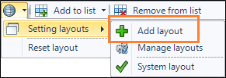
To save a custom grid layout, open the Setting Layouts menu and click Add Layout. When prompted, enter a name for your layout and click OK. The new layout is available in the Setting Layouts menu.